
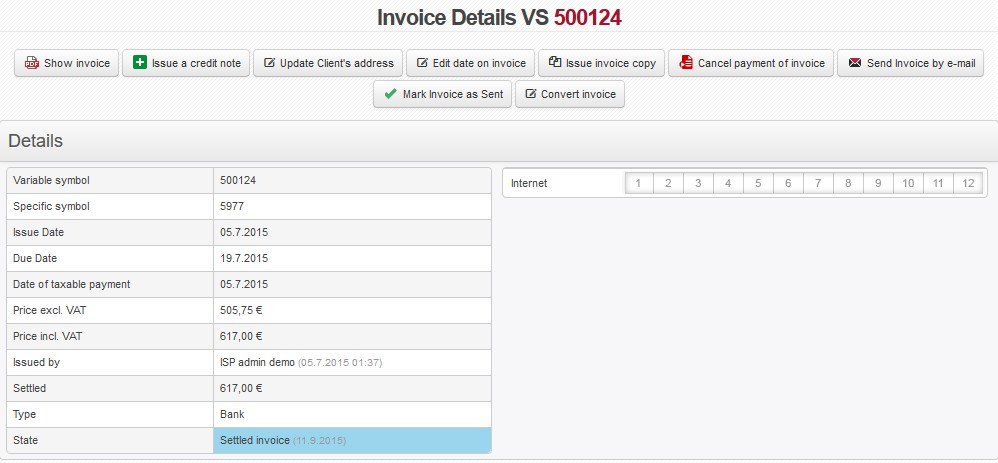
 Show invoice Show invoice |
Opens/saves invoice for later print or display (in pdf format). |
 Pay in Cash Pay in Cash |
Insert payment for not settled invoice. |
 Issue a credit note Issue a credit note |
You can issue a credit note for both, paid and unpaid invoice. |
 Cancel invoice Cancel invoice |
Cancelling of issued, unsettled invoice. You have to state a reason. |
 Edit invoice Edit invoice |
Use it for modification or deletion of one or more items on invoice. You will be able to modify invoice until it has been paid. |
| Update client's address |
If client changes invoicing data after invoice has been issued, update data in Client card and use this option to reflect the changes on invoice. This will not issue a new invoice, it only modifies the existing one. |
| Edit date on invoice |
An option to modify issue date, due date, and taxable date on issued invoice. If a client is not able to settle invoice in due date but promises to pay it later, you may extend due date by a certain number of days. Confirm this to make the change on invoice. |
| Issue invoice copy | Issue a new invoice where invoice data from copied invoice are used. |
| Cancel payment of invoice |
If you wish to cancel payment on invoice press this button to do so, and insert reason for cancelling the payment. Invoice status will change from “Paid” to “Unpaid” by cancelling it, and you will be able to modify invoice, e.g. make a new payment. You can cancel a cash payment provided that payments have not yet been sent in Invoicing Cash box. If payments are sent you have to make a correction tax document for an invoice. |
| Inclusion of overpayment |
If client has overpayment you may use it to pay for issued invoice or its part. Total client overpayment is and Total client undercharge on invoice is are displayed along with inclusion date. |
 Reminder by E-mail Reminder by E-mail |
It enables you to issue a reminder for a certain invoice. You can charge the request individually. A prerequisite for display of this button is to have unpaid invoice after due date. You can use template from Invoicing Settings Templates Reminders. |
| Confirm the credit note | Confirmation of credit note; paid amount will be given back to bank account. |
| Delete confirmed credit note |
Deleting may cause a gap in the invoice numerical series! |
| Send Invoice by e-mail |
Send issued invoice |
 Mark Invoice as Sent Mark Invoice as Sent |
Selected When invoice is marked as sent, it is excluded from other invoices that are intended for bulk sending. |
 Invoice export into POHODA (CZ only) Invoice export into POHODA (CZ only) |
Invoice gets exported from the system for insertion into accounting SW. |
| Convert invoice |
It enables you to transfer invoice to another client in the system. It will display a list of all clients which you can search by name. Invoice will be stored with new address details when you press Save. |
Payments
It displays a history of invoice payments.
| Payment Type | Type of payment, e.g. Cash payment, Overpayment (inclusion of overpayment) |
 |
It displays cash receipt. |
history
Events in invoice history. All events, such as payment, credit note are recorded here.
Log of Sent e-mails
History of sent emails of invoice. You can read status of sent email (Sender Status), or Recipient Status from sender/recipient server logs. This way you will be able to identify what happened with email.