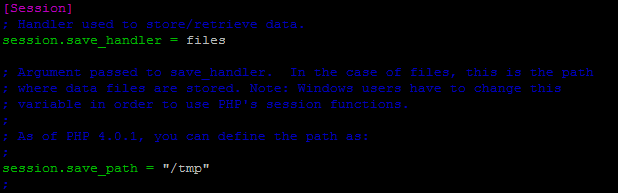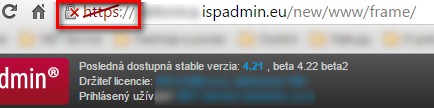
These are instructions on how to create and set up trustworthy certificates (https) for your ISPadmin installation and the Client portal. From the information in the address bar, you can find out whether the website in question is secured or not. Different browsers inform users of this fact in different ways. For example: If https appears in front of the URL/IP address of ISPadmin, then the website is secured. If https is crossed out, it is unsecured.
How to create a certificate
The latest version of ISPadmin incorporates a utility called certificate.pl that uses the Let´s Encrypt certificate authority to issue certificates.
Before you launch this utility, you need to have at your disposal the DNS records for the administration interface of ISPadmin (e.g. ispadmin.yourcompany.com) and for the Client portal (e.g. portal.yourcompany.com), and also enable ports 80 and 443 in SettingsSyst. settingsSecurity , Global line > HTTP 80/443 =  .
.
You can launch the utility with this command:
/usr/local/script/ispadmin/certificate.pl
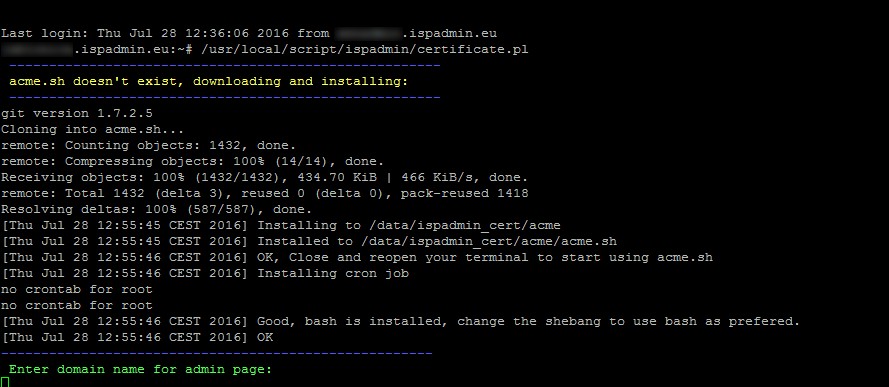
When the script asks you to enter the DNS records for the administration interface of ISPadmin and for the Client portal, do so. Confirm your entries by Enter.

Check whether the listed IP addresses correspond to the IP address of the server. Any discrepancies would lead to an error during the creation of a given certificate. If there are indeed discrepancies, the DNS records in question must be fixed (choose the no option in the script - n) and launch the script again.

If the DNS records contain the correct IP address, certificates will be generated correctly. At this point, the script asks you whether you want to install the created certificates on the apache server. If you have made no changes to the configuration of the apache server (your own configuration), confirm by entering y . If you want to (for whatever reason) copy the certificates to the server manually, you can see in front of you the 3 locations where the individual parts are to be found. Enter n and set the certificates up manually in /etc/apache2/httpd.conf.
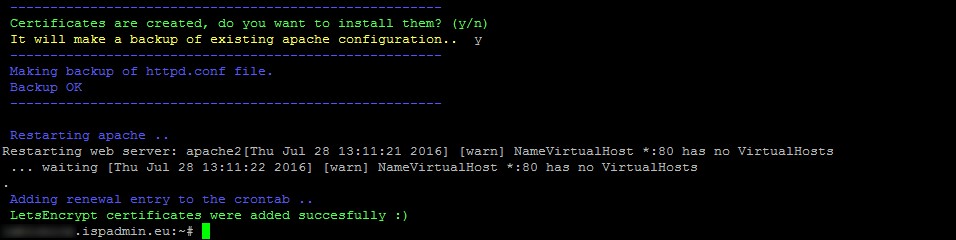
If you entered y, the installation of certificates was done automatically. The system also carried out the backup of the apache configuration and the restart of the apache server.
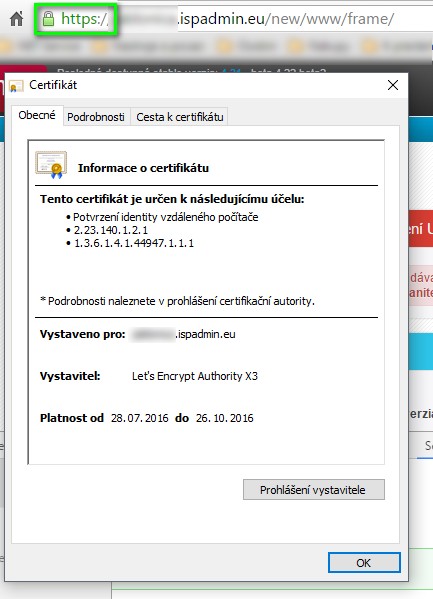
Now the certificates are valid and you can see https in the browser. Certificates are automatically renewed every 3 months.
Error during the creation of certificates
If an error occurs during the creation of certificates, proceed as follows:
1. Back up the /etc/apache2/httpd.conf file.
cp /etc/apache2/httpd.conf /etc/apache2/httpd.conf.backup
2. Modify the file according to the code below. Enter the correct addresses for the administration interface and for the Client portal in the respective ServerName lines.
options FollowSymLinks
## ISP Admin
<VirtualHost *:80>
ServerName admin.domain.xy
DocumentRoot "/data/support/ispadmin/"
AddDefaultCharset UTF-8
<Directory /data/support/ispadmin/>
Options ExecCGI
AllowOverride All
</Directory>
CustomLog /var/log/apache2/access_support_ispadmin.log combined
AddType application/x-httpd-php .php .php3 .php4
php_admin_value open_basedir "/data/support/:/tmp/:/data/:/usr/local/script/ispadmin/:/data/backup/"
php_admin_value include_path ".:/usr/local/lib/php/:/tmp/:/data/support/:/usr/local/script/ispadmin/"
php_admin_value disable_functions "openlog, exec, passthru, proc_open, proc_close, shell_exec"
php_admin_value display_errors "On"
php_admin_value safe_mode "Off
php_admin_value safe_mode_exec_dir "/usr/local/script/ispadmin/"
php_admin_value safe_mode_allowed_env_vars none
php_admin_value safe_mode_include_dir ".:/usr/local/lib/php/:/tmp/:/data/support/:/usr/local/script/ispadmin/"
php_admin_value register_globals "On"
php_admin_value sendmail_path "/usr/sbin/sendmail -t -i -f This email address is being protected from spambots. You need JavaScript enabled to view it."
</VirtualHost>
## ISP Admin support
<VirtualHost *:80>
ServerName clientportal.domain.xy
DocumentRoot "/data/support/ispadmin/new/www/clientinterface/"
AddDefaultCharset UTF-8
<Directory /data/support/ispadmin/new/www/clientinterface/>
Options ExecCGI
AllowOverride All
</Directory>
CustomLog /var/log/apache2/access_support_ispadmin_support.log combined
AddType application/x-httpd-php .php .php3 .php4
php_admin_value open_basedir "/data/support/ispadmin/:/tmp/:/usr/local/script/ispadmin/"
php_admin_value include_path ".:/usr/local/lib/php/"
php_admin_value disable_functions "openlog, exec, passthru, proc_open, proc_close, shell_exec"
php_admin_value display_errors "On"
php_admin_value safe_mode "Off"
php_admin_value register_globals "On"
</VirtualHost>
Server Error - Error 500
If the following error occurs

it will be necessary to modify the configuration file /etc/php5/apache2/php.ini (see the picture below) and then restart apache (service apache2 restart).