
×

Warning

JUser: :_load: Unable to load user with ID: 43

JUser: :_load: Unable to load user with ID: 40

Add pending items

ISPadmin - Client management

Create a pending item and review those already created. Pending items are often used for invoicing scheduled interventions and reminders, or other services which are not invoiced regularly. Review not invoiced pending items in the entire system in Invoicing Overviews Pending Items.

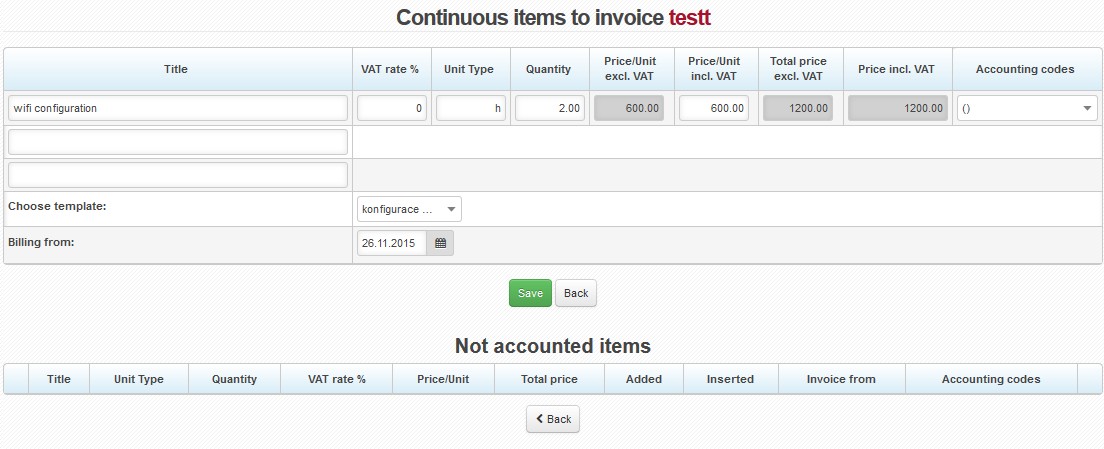
Add pending item

Choose template By doing so, requested data are pre-filled. This way adding a new row as pending item will be both unique, and correct. Define templates in Invoicing Settings Templates Pending Items. If you don´t use templates, or desired item is not defined you have to fill in the following data manually.
Title Item description
 VAT rate Item VAT rate; rate from Invoicing Settings General, ID dph is set by default.
Unit type Type of unit, e.g. hour, pcs.
 Quantity Number of item units
 Price/Unit excl. VAT Price per item excl. VAT The system will calculate the next 3 fields automatically.
Accounting codes

Application of items for needs of double-entry bookkeeping. Set it up in Invoicing Settings Accounting.

Billing from

Initial date of invoicing the service/item. Usually it is left unchanged (i.e. current date is used), the first invoice is issued at next invoicing. (Invoicing Invoices). If you move the date forward, the first invoice will be issued following this date.

icon info2 You may use Internet system variable $BILL_FROM$, which uses this date. Use for e.g. contract templates when a specific service is selected.

Press Save to add the item. It will be displayed in Uninvoiced items where you can modify it.

icon edit Edit item
icon delete btsp Delete item
  Copy item data to new item


alert icon  If client pays regular invoices using permanent bank order, pending items on invoice may stay unnoticed and an invoice unpaid. That´s why you´d better issue a standalone invoice for the intervention (Invoice Pending Items).


System back-ups

ISPadmin has an automatic data back-up functionality. It is possible to store...

MySQL database

Restart of MySQL service /etc/init.d/mysqld restart Recovery of database...

ISPadmin update

Switch to new system version using the following command from command line (logi...

Postfix mail server

By default, the SMTP server is configured in the way that it is only possible...

System Variables

System variables are used for replacing items such as client's name, address,...

System migration

The information contained in this manual pertains to the migration of ISPadmin ...

Emails cannot be sent because of their size

Check and modify the settings of the following parameters: upload_max_f...

Ramdisk and RRD backup-data restoration

More on RAM disk here (index.php?option=com_content view=article id=508:4-11-bet...

HTTPS Certificates

These are instructions on how to create and set up trustworthy certificates (h...

Crashed table repair

these instructions (index.php?option=com_content view=article id=1284:system-bac...

Moving graphs to RAMDISK

The main usage load for disks, on which the system is installed on, is the gener...

Forgotten root password

You can try two ways: First procedure 1. Insert installation DVD of ISPa...

Text editors

Nano text editor is always used in this documentation. If you don’t...

Linux update

For reasons of compatibility and availability of future versions of ISPadmin,...

ISPadmin serving as SMTP server

By default, the SMTP server is configured in the way that it is only possible to...

Cache-only DNS server

Caching-only is ready after installation of ISPadmin. It is sufficient to use IP...

Technical support status cannot be verified

If technical support cannot be verified, most likely it is due to DNS malfunc...

Administration of running processes

We recommend using htop program for easier monitoring of running process inst...

Timezone settings

"Europe/Prague” timezone is set by default. To change it, do the following:...

IPv6

ISPadmin does not currently support IPv6, it only supports IPv4. It is, of cours...

Configuration / update of IP Address

A) Temporary setting of IP address (until next Linux restart).Just add the fo...

High CPU load of ISPadmin server

Run htop command from the Linux console to determine the problems. With this ...

ISPadmin operation behind NAT

If you have your ISPadmin located on private network and wish to access it from ...

Manual update

If the Error 404: Not Found message appears during an update, it will be necessa...

Inner/outer address on ISPadmin server

The system is typically connected to the network by one network card only. Both ...

Running service check

If you need to find out if a certain process is running use the following comman...

Error "Allowed memory size of ... bytes exhausted ..."

Fatal error: Allowed memory size of ... bytes exhausted (tried to allocate ... b...

What is the directory structure in /usr/local/script/ispadmin/rrd_data?

headend ipaccount modem routers snmp switches user_devices wifi

«
»

CONTACT

NET service solution, s.r.o.
Žerotínova 3056/81a
787 01 Šumperk
Czech Republic