

IPTV
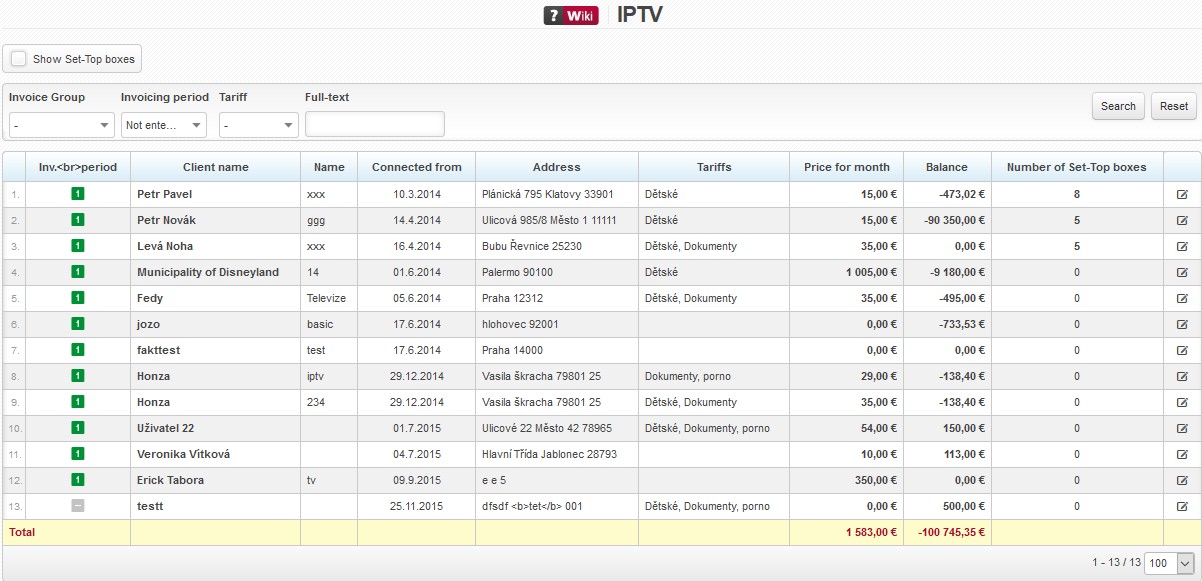
Client with active IPTV service (SettingsTariffsIPTV).
IPTV is a service of providing television via the Internet as the digital television is broadcasted via IP protocol and computer networks. Set-top box is used for receiving. Its purpose is to bring the customer a broader offer of television programmes and broadband data services. Another significant attribute is the ability to transmit images in higher quality than analogue signal.
| Display set-top boxes | It displays all client´s set-top boxes.  is displayed for an active set-top box in Address column. Click on this icon to ping a relevant IP address. is displayed for an active set-top box in Address column. Click on this icon to ping a relevant IP address. |
FILTeR
Client list may be filtered by displayed criteria.
Fulltext search does not work in all fields due to server load. It only works in the important ones (e.g. name, street, city, Postcode code, company, phone number, client number, variable symbols, internal note etc.).
 You may define a minimum number of characters to be entered by an administrator for a search to work. Define the limit for each administrator in Settings Administrators Administrators, parameter Limited clients´ search.
| Reset | Resets the filter to display all entries. |
COLUMNS
 |
Click on this icon to open a menu, in which you can check columns to be displayed (Table settings), columns to be printed (Print settings), and Search settings. Then press Save and
All entries can be sorted by every displayed column. Click on column name to display the list by the requested column. Click once to sort in ascending order, twice for descending order. |
 . Display configuration is saved for each administrator separately.
When you hover over client´s name, a basic window with details of a client account is displayed.
Click on client´s name to display Client card.
| Invoicing period | Defined in Active services, the options are: - No invoicing, |
|---|---|
| Client name | Client´s first name and surname or company name. We strongly recommend to use Surname First name due to better sorting in case of bigger numbers of clients. |
| Name | It helps identify services of the same category (e.g. Internet) of one client. No need to use it if a client has only one service of the same category. |
| Connected from | Client´s connection date, or date when service was added. |
| Address | Home or installation address. Installation address is displayed by default, if it differs from domicile. Installation address is set for each active service. |
| Tariffs | Set up tariffs in Settings Tariffs. |
| Price per month | Invoiced price per month base on selected tariff, or individual price. |
| Balance | Actual balance of client´s account. Positive number means an overpayment, and negative one is a debt. |
| Number of Set-Top boxes | Number of client´s set-top boxes. Click on number of set-top boxes to display lines with respective set-top boxes. is displayed for an active set-top box in Address column. Click on this icon to ping a relevant IP address. |
 Edit Edit |
Service update in Client card. A new window is opened identical to adding new service. |
 Monthly,
  Quarterly,
  Half-yearly,
  Annually