

Routers
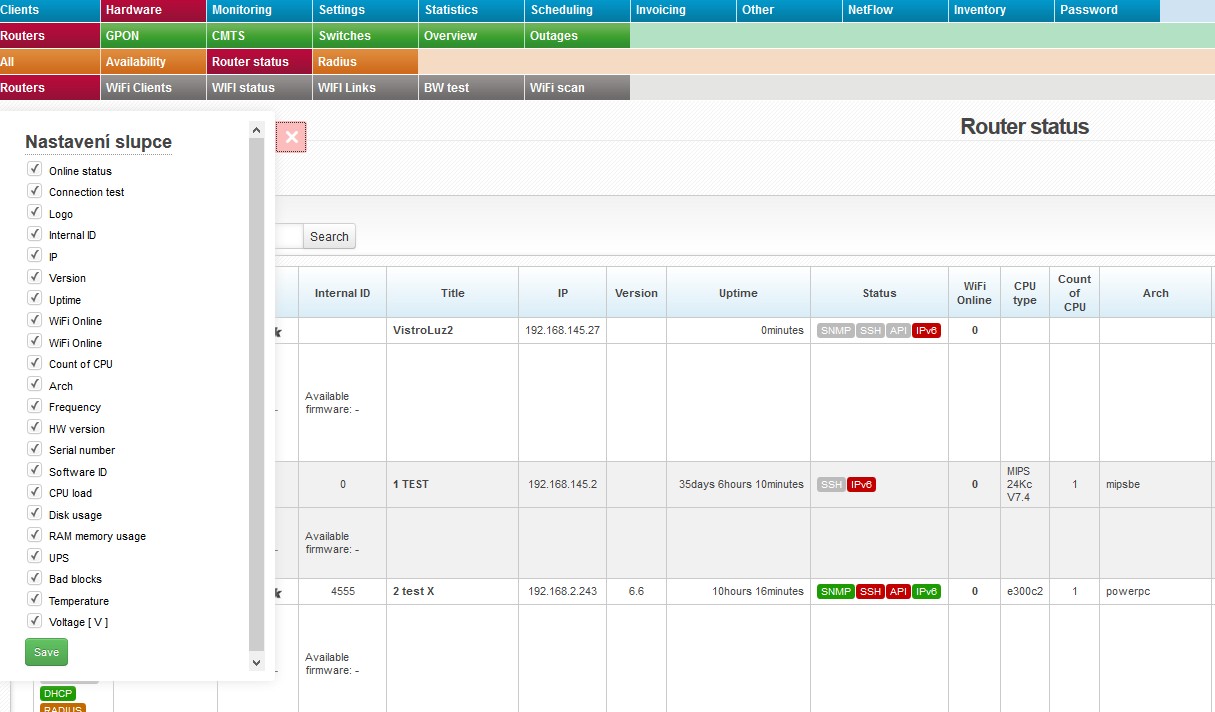 This bookmark gives you an overview of routers in the system.
Displayed information is subject to an active router interface.
 |
Click on this icon to open a menu, in which you can check columns to be displayed (Table settings), columns to be printed (Print settings), and Search settings. Then press Save and
All entries can be sorted by every displayed column. Click on column name to display the list by the requested column. Click once to sort in ascending order, twice for descending order. |
 . Display configuration is saved for each administrator separately.
 Uncheck unused columns to speed the loading of the page up.
| Extended statement | It will display router identity - its name from Winbox, not ISPadmin. The following icons are also displayed: FIREWALL, DHCP, MACFILTER, WLAN FILTER, and RADIUS. Inactive settings is highlighted in grey, e.g. FIREWALL. It also displays information about Current/Available firmware. |
Columns
| Online status | ■ online |
|---|---|
 |
It will test connection to router and connected devices (Ping test, SNMP test, SSH test, API test). |
| Title | Click on the name to display router in Hardware Routers All, where you can also edit it. |
| IP | IP address of device |
| Version | OS version of the installed system |
| Uptime | Uptime from the last reboot |
| Status | Status of the following services: SNMP, SSH, API, and IPv6. Active service is in green, e.g. SNMP. |
| WiFi Online | Number of connected WIFI clients; click on it to display a list of WIFI clients. |
| Arch | Processor architecture |
| Frequency | Processor frequency |
| Serial number | Routerboard serial number |
| Software ID | MikroTik license ID |
| CPU load/Disk usage/RAM memory usage | Click on % to display daily/weekly/monthly/yearly graphs. |
| UPC/Voltage | If there is a UPS device connected to MikroTik router (driver is installed correctly) and UPS is recognized, so the system is able to monitor UPS voltage and send notification e-mail in case of power outage. If UPS is connected, the column Voltage shows a current UPS voltage. Click on the voltage value to display a detailed graph. In case of power outage, the system sends an email defined in Settings System Settings General, ID admin_email. |
| Bad blocks | Number of error blocks of flash memory for MikroTik routers |
| Temperature | Routerboard temperature (valid for some MikroTik routers only) - click on the value to display graphs. |