
×

Warning

JUser: :_load: Unable to load user with ID: 43

Routers

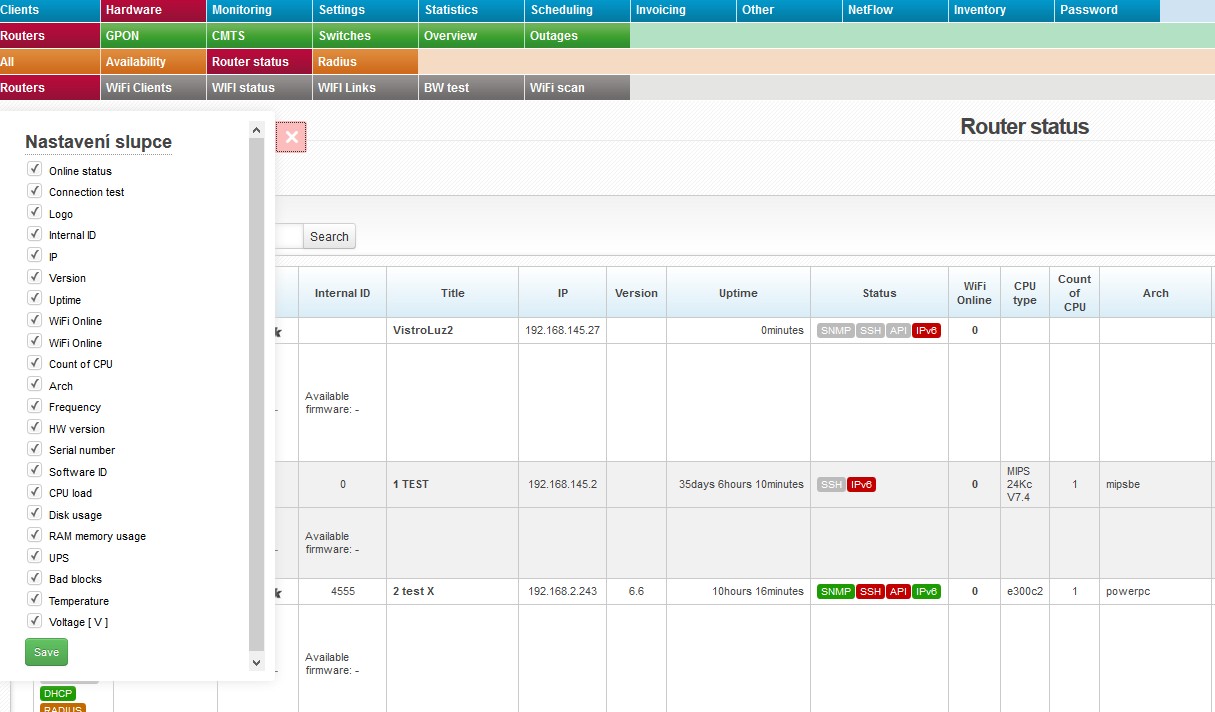
routery router status routeryThis bookmark gives you an overview of routers in the system.

Displayed information is subject to an active router interface.


 iconopen

Click on this icon to open a menu, in which you can check columns to be displayed (Table settings), columns to be printed (Print settings), and Search settings. Then press Save and iconoffright. Display configuration is saved for each administrator separately.


icon info2 Uncheck unused columns to speed the loading of the page up.


All entries can be sorted by every displayed column. Click on column name to display the list by the requested column. Click once to sort in ascending order, twice for descending order.

  Extended statement It will display router identity - its name from Winbox, not ISPadmin. The following icons are also displayed: FIREWALL, DHCP, MACFILTER, WLAN FILTER, and RADIUS. Inactive settings is highlighted in grey, e.g. FIREWALL. It also displays information about Current/Available firmware.


Columns

Online status

■ online
■ offline

icon connect It will test connection to router and connected devices (Ping test, SNMP test, SSH test, API test).
Title Click on the name to display router in Hardware Routers All, where you can also edit it.
IP IP address of device
Version OS version of the installed system
Uptime Uptime from the last reboot
Status Status of the following services: SNMP, SSH, API, and IPv6. Active service is in green, e.g. SNMP.
WiFi Online Number of connected WIFI clients; click on it to display a list of WIFI clients.
Arch Processor architecture
Frequency Processor frequency
Serial number Routerboard serial number
Software ID MikroTik license ID
CPU load/Disk usage/RAM memory usage Click on % to display daily/weekly/monthly/yearly graphs.
UPC/Voltage If there is a UPS device connected to MikroTik router (driver is installed correctly) and UPS is recognized, so the system is able to monitor UPS voltage and send notification e-mail in case of power outage. If UPS is connected, the column Voltage shows a current UPS voltage. Click on the voltage value to display a detailed graph. In case of power outage, the system sends an email defined in Settings System Settings General, ID admin_email.
Bad blocks Number of error blocks of flash memory for MikroTik routers
Temperature Routerboard temperature (valid for some MikroTik routers only) - click on the value to display graphs.

Removing records from ISPadmin

Delete client Deleted client is not deleted from the system, instead its rec...

Adding/Editing invoice group

Invoice group set-up Name The internal name of a given invoice group...

Invoice period, floating period

The options are: not invoiced, monthly, bimonthly, quarterly, half-yearly, and y...

Proforma invoices

Proforma invoice is a non-fiscal document. It is merely an instruction for the c...

Generating reminders

Reminders are automatically generated every day at the time set in the reminder_...

Change of numerical series for Invoicing

Typically, you would need to change a numerical series for Invoicing on New Year...

Introduction to invoicing

Here you will find basic settings for you to start using Invoicing module. Gene...

Export of invoices

You may export invoices into your accounting software if it is supported by I...

Invoice logo/stamp

In Invoicing Settings Invoice Groups, while adding a new group (+ Add new gro...

Can we have multiple IBAN codes for an invoice group?

No. One IBAN equals one invoice group. You cannot have more IBAN codes for on...

Charging clients for tariff changes

You might want to charge clients, for example, when they decide to change to ...

One-time invoice for a service provided in a certain time period

If you want to issue a one-time invoice for a certain service that is provide...

Invoice layout modification

You cannot change invoice layout. You can only change the following (Invo...

How to issue invoices in foreign currency

If you want to issue invoices in foreign currency you can do so in a few ways...

Invoice due date functionality

Standalone Invoice (index.php?option=com_content view=article id=1202:creating-a...

How to send a client an email containing all of their unpaid invoices

If you want to send a particular client an email containing all of their unpaid ...

How to issue an expenditure cash slip

The system issues an expenditure cash slip when overpayments are refunded in ...

Does ISPadmin support the PayU payment gateway?

No, the PayU payment gateway is not supported by ISPadmin.

How to add overpayment into client´s credit

Let’s assume you use FIO bank. Go to InvoicingBankFIO to display all incoming...

A credit note issued, yet the invoice is still marked as "unpaid".

When viewing a particular credit note, you have to use the Confirm the credi...

Currency not exported

Currency is loaded from invoice group set up. You have to set up currency for...

Invoice items are not in the same language as my ISPadmin

You may define your own descriptions of invoiced items in SettingsActive service...

How to set the description of a pending item on an invoice

Go to Settings Syst. settings Inventory. In the Description of pending items ...

How to set the invoicing period for the VoIP service

In Settings Syst. settings General in the voip_offset item, you can state tha...

How to set invoice numbering

On this page, you can find out how to appropriately and correctly set invoice...

Where to set the email address from which invoice emails are sent?

Invoice emails are sent from the email address that you have entered on the c...

Import of CSV bank statement files to ISPadmin is not working

If you cannot import a CSV file from your bank to the ISPadmin system, check ...

How to use one client payment to settle multiple invoices

In Invoicing Bank, you can now settle more than one invoice at once (There is...

Payments from bank emails have not been imported and matched.

Check whether there are bank emails in the Invoicing Bank E-mail tab. If ...

Calculation of VAT on invoices

VAT is calculated for each individual invoice item. It is always rounded to 2...

How to modify the text on an invoice

You can change the descriptions of items on an invoice in SettingsService Gro...

Configuring your PayPal account

In order to have your PayPal-payments matching functional, each individual paym...

CSV format for payment import

Column 1 SS (Specific symbol) Column 2 Note Column 3 VS (V...

«
»

CONTACT

NET service solution, s.r.o.
Žerotínova 3056/81a
787 01 Šumperk
Czech Republic