
×

Warning

JUser: :_load: Unable to load user with ID: 43

JUser: :_load: Unable to load user with ID: 40

Routers

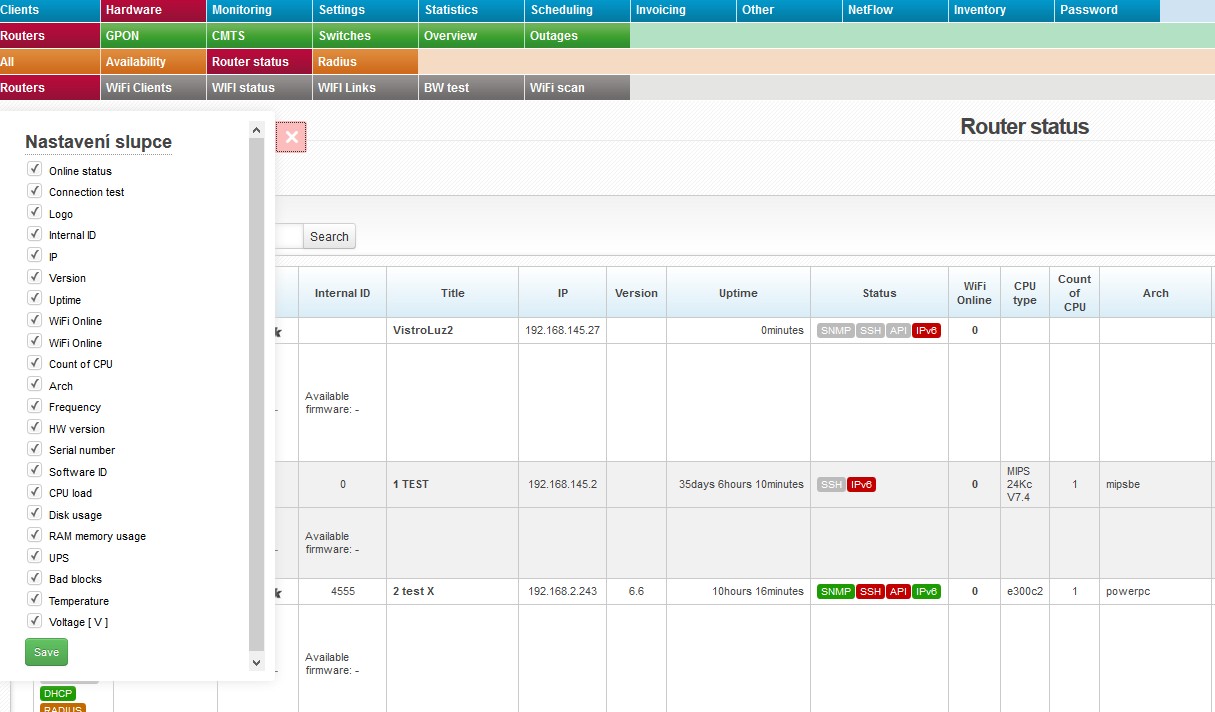
routery router status routeryThis bookmark gives you an overview of routers in the system.

Displayed information is subject to an active router interface.


 iconopen

Click on this icon to open a menu, in which you can check columns to be displayed (Table settings), columns to be printed (Print settings), and Search settings. Then press Save and iconoffright. Display configuration is saved for each administrator separately.


icon info2 Uncheck unused columns to speed the loading of the page up.


All entries can be sorted by every displayed column. Click on column name to display the list by the requested column. Click once to sort in ascending order, twice for descending order.

  Extended statement It will display router identity - its name from Winbox, not ISPadmin. The following icons are also displayed: FIREWALL, DHCP, MACFILTER, WLAN FILTER, and RADIUS. Inactive settings is highlighted in grey, e.g. FIREWALL. It also displays information about Current/Available firmware.


Columns

Online status

■ online
■ offline

icon connect It will test connection to router and connected devices (Ping test, SNMP test, SSH test, API test).
Title Click on the name to display router in Hardware Routers All, where you can also edit it.
IP IP address of device
Version OS version of the installed system
Uptime Uptime from the last reboot
Status Status of the following services: SNMP, SSH, API, and IPv6. Active service is in green, e.g. SNMP.
WiFi Online Number of connected WIFI clients; click on it to display a list of WIFI clients.
Arch Processor architecture
Frequency Processor frequency
Serial number Routerboard serial number
Software ID MikroTik license ID
CPU load/Disk usage/RAM memory usage Click on % to display daily/weekly/monthly/yearly graphs.
UPC/Voltage If there is a UPS device connected to MikroTik router (driver is installed correctly) and UPS is recognized, so the system is able to monitor UPS voltage and send notification e-mail in case of power outage. If UPS is connected, the column Voltage shows a current UPS voltage. Click on the voltage value to display a detailed graph. In case of power outage, the system sends an email defined in Settings System Settings General, ID admin_email.
Bad blocks Number of error blocks of flash memory for MikroTik routers
Temperature Routerboard temperature (valid for some MikroTik routers only) - click on the value to display graphs.

Creating a standalone invoice

Read more ... (index.php?option=com_content&view=article&id=1159&...

Removing records from ISPadmin

Delete client Deleted client is not deleted from the system, instead its rec...

Add new / Edit existing Service

If you have added a new client, it just a contact which is not linked to any ac...

System Variables

Read more ... (index.php?option=com_content&view=article&id=1380&...

Accepting Cash Payment

overpayments (index.php?option=com_content view=article id=1088:overpaymen...

Edit invoice

Modify an invoice changing the following: Title Item description ...

No permission for adding overpayment into client´s credit

If you are trying to add overpayment, and see Permission denied message you h...

Limited data consumed / Traffic graphs are high

If you experience one/both of the following problems Limited data gets consum...

Suspension of service

The function of suspending a client serves to temporarily block the service with...

Creation of client number

While adding a new contact to the system, you will be offered first unused clien...

Return of overpayment

Bulk order (index.php?option=com_content view=article id=628:returned catid=488:...

How to display client portal login credentials on an invoice

In Invoicing Settings Invoice Groups, while adding a new group (+ Add new group)...

Add New Contact

a requested service in Client card (index.php?option=com_content view=article...

Send invoices by email

Invoices get sent in PDF automatically upon their issuing. Sending via both, reg...

Entering an address

You have the following options to enter address: Fill in respective fields: S...

PING to client does not work

PING to client function is off by default. It is to reduce network load which in...

More than 1 item in email or phone number fields

You will be able to add more items in every field in the system designed for ema...

Charging clients for tariff changes

You might want to charge clients, for example, when they decide to change to ...

One-time invoice for a service provided in a certain time period

If you want to issue a one-time invoice for a certain service that is provide...

How to send a client an email containing all of their unpaid invoices

If you want to send a particular client an email containing all of their unpaid ...

How to give a discount

Options for discount of regular service rate are as follows: Tariff rate dis...

How to assign an IP address pool to a client

When editing/adding the Internet service (index.php?option=com_content view=arti...

VAT missing on a cash receipt

If the client pays for the invoice in cash, VAT tax is not stated on the cash re...

How to issue an expenditure cash slip

The system issues an expenditure cash slip when overpayments are refunded in ...

Use of IP address

To find out, which client used a certain IP address in specified time, go to ...

Lookup by phone number

You can use http://ISPadmindomain.com/new/www/find-client-by-phone-number/?numbe...

Filtering clients base on their invoicing

Invoicing is related to services, not clients. A client can have e.g. 2 active s...

How to add a NAT IP address

A NAT IP address can be added in the Client card. When you are editing the In...

How to add supplementary information to contact emails and phone numbers

If you need to add supplementary information to a client's email address and ...

How to increase internet speed in off-peak hours

If you want to increase a client’s Internet speed in off-peak hours...

Displaced invoice margin

If invoice margins are printed incorrectly you have to check print settings of P...

Is it possible to set a specific speed for IPTV service?

No, it is not possible. You cannot set up special speed profiles for the IPTV...

Is it possible to export/print out all the contracts of a client at once?

No, it is not possible. Each contract is unique. It is a single file and it i...

Suspension of the internet service at the client's request

If your client contacts you and wants you to temporarily suspend the Internet...

Is it possible to set an installation fee discount anywhere in the system?

No, it is not. You cannot enter such a discount to the system at the moment. ...

«
»

CONTACT

NET service solution, s.r.o.
Žerotínova 3056/81a
787 01 Šumperk
Czech Republic